

I’ve always wanted the option to create custom components via React and use them in UI Builder.
Just imagine having the possibility to compose structure like this:
Container
— Button
— My React component ⭐
— Container
— — Stylized text
— — Custom component created in UI Builder
— Highlighted value
— Custom component created in UI Framework
— Container
— — Another React component ⭐
etc.
All past efforts hit a wall, but I finally figured it out. Here is the implementation guide, complete with a link to a functional repository.
🖼️ What You See Is What You Get
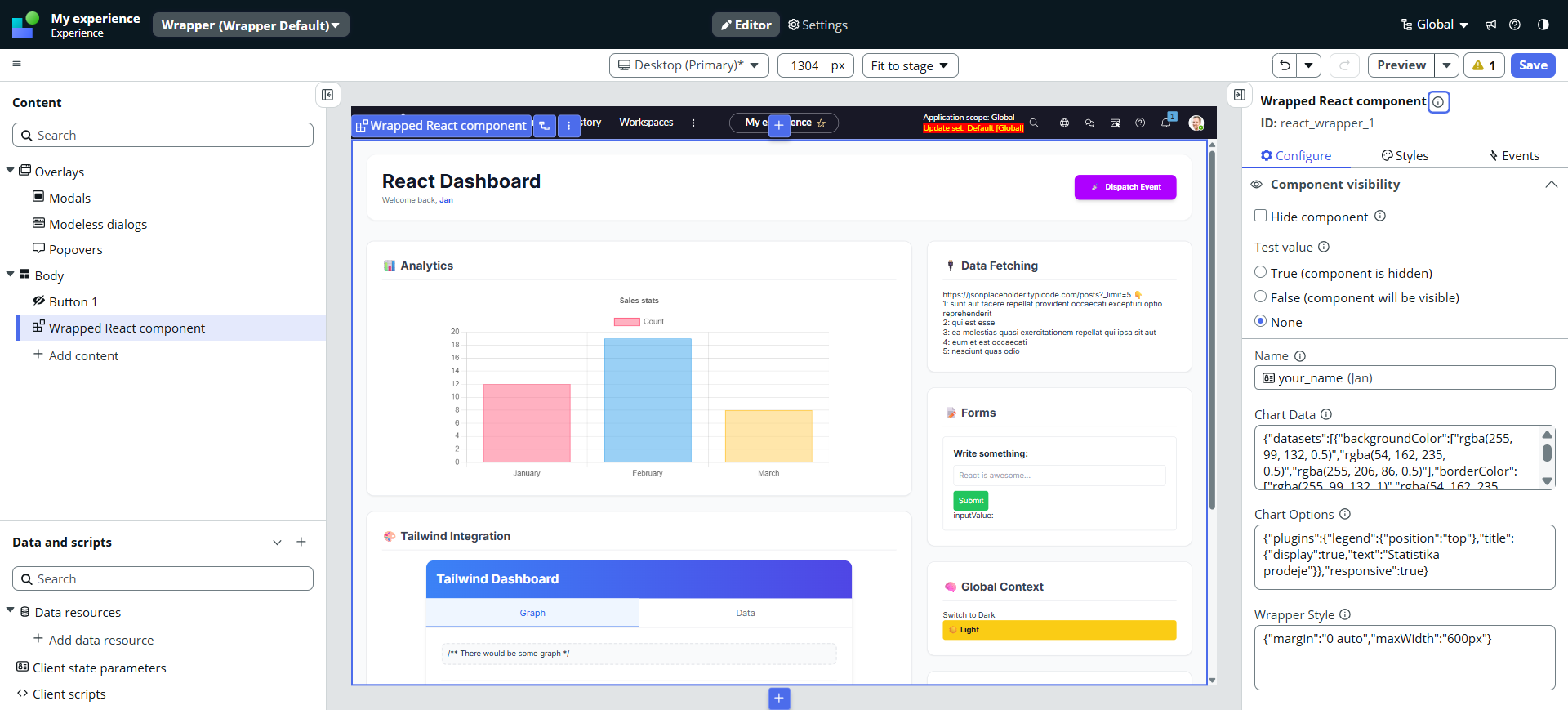
What you see above is a React component in UI Builder. This is what the example repo looks like (all the React components are inside one big React component for showcase purposes – that’s why you see only one component in the left navigation tree).
In real production scenario, all the cards would be standalone components in UI Builder, all communicating together via the parent UI Builder page.
This article is how I did it.
Link to the repo at the end 😎
Audience
First, let’s define who this article is for:
✅ You work in UI Builder
✅ You occasionally need to code a custom component
✅ You feel limited by UI Framework (because of the architecture or missing favorite libraries)
✅ You DO NOT WANT to use a UI Page or a Portal component (which doesn’t make sense for UIB anyway)
If you fit the description above, continue reading.
Before I start
There were several attempts for React in ServiceNow. Probably the two best known are as follows:
This article describes how to replace the Snabbdom renderer with React renderer. I tried it; it worked locally but failed after deployment to the instance. There is a lot happening during the deployment process, and I was not able to trick Babel to let it through in the snc ui-component deploy phase. I contacted the author, but got no response, so I quit this attempt.
🔗UI Framework as a wrapper by Andrew
Andrew describes how to use the UI Framework component as a wrapper for React and other libraries. Well, I like the idea, but the implementation style wasn’t for me. I don’t want to manually inject code snippets somewhere on the instance. That’s not the developer flow I was looking for. Imagine having a team bigger than just one expert: how would you drive an implementation scenario where someone has to copy & paste code manually? Nope.
Since I wanted a native UI Builder component (not a UI Page or a full React application inside an iframe) and none of the solutions I found worked or fulfilled my requirements, I had to create my own.
My requirements
🧑💻 No hacks
I did not want to trick, inject, or replace anything manually. I wanted to proceed in a clean and developer-driven way.
🎁 One component package
I did not want to implement one component here and another there and then somehow join them on the instance. I wanted a single repo containing everything, so after deployment, I have the UI Builder component ready to use.
🩼 No dependencies
I wanted zero external dependencies, or as few as possible. Only this way could I deliver a stable solution that won’t break in six months or so.
⭐Easy to jump in
I wanted simple usage. No difficult configuration or complex commands—just hit (the command) and go.
🔧 Tools
I wanted to stick to the standard CLI commands: snc ui-component develop and snc ui-component deploy. I did not want to leave this workflow.
Architecture
The architecture is pretty simple:
UI Framework component
This is what is exposed to UIB. It gets properties from UIB and dispatches events back to UIB.
⬇️
React component – bridge
It’s inside the UI Framework component.
It handles communication between the outer world (via UIF component) and your React app.
⬇️
React component – app
It’s a child of the React bridge and this is where your actual React application sits.
Data flow
Downwards:
ServiceNow (UI Builder) properties are passed as standard props to the UI Framework component, which passes them down to the React root component. From this moment, it’s up to you and your app design, it’s standard propagation of the properties down to the React children.
Upwards:
Nothing different here either. The dispatch function is used for dispatching events out. This dispatch function is passed down to the React root component. Children of the React root component communicate via standard action callbacks; whenever there is a need to fire something back to the UI Builder, the React root can dispatch an action.
Technically, there is no difference between the “React bridge” and the “React app”; I just wanted to decouple the bridge logic from the rest of the app. But if you prefer, you can start your React app logic right inside the bridge. You messy mess 😛
✅ What works
Full React 17 is working inside, so you can use all your well-known hooks (useState, useEffect, …), contexts, etc. Tailwind is working as well (with a little bit of a workaround, to be honest). I would say that for 99% of business use cases, it is more than enough.
❌ What does not work
It turned out that ServiceNow (Shadow DOM), webpack and the babel plugin are tough enemies. I did not find a way to make modern libraries like Material UI or Ant Design work. They operate on a CSS-in-JS principle, and all generated styles are injected into the head of the main document—which is blocked by Shadow DOM. Some libraries allow defining the root injection target, but even when I tried to forward them to the shadow root, Webpack didn’t like it.
React 18 was a no-go as well. The ServiceNow deployment process (under the hood) relies (probably) on an older Webpack version, which struggles with modern “sub-exports” defined in package.json (required by react-dom/client).
Repository & Next Steps
Talk is cheap, show me the code.
I prepared a template repository that implements everything described above. It is ready to clone, install, and deploy.
🎁 You can find the full source code here:
https://github.com/janmoser87/ui-framework-react-wrapper
The repository contains “one big React app” for showcase purposes, but the principle (UIF as a wrapper, React inside) would be exactly the same for a simple button or a big enterprise app. 👍
Feel free to fork it, break it, and fix it. If you find a way to make Material UI work or have any other improvements, pull requests are more than welcome.
Happy coding!
Jan
 My UI Builder Corner ☕
Leave a comment