

OK, it’s not a standard update this time. I was cooking 🚀 and it’s something I like a lot! Take a look 👇
React approach in ServiceNow UIB
There was a hackathon happening in my company last month and our team was working on a profiling catalog item (searching for errors, discrepancies, etc.). The whole app was a pure data-driven beast where all logic and work happened on the backend and the UI Builder acted only as a dumb data printer.
Of course it was me who created the UIB app 😎
As we were already on Zurich, I wanted to utilize UIB components as much as possible. So I went and developed the app in kind of React-ish way: I broke everything in pure, reusable components and composed the whole app with them.
The app is nicely structured, easily testable and maintainable. No God big experiences or page collections anywhere, just pretty simple components puzzled all together.
Bridge to cross
It sounds nice, right? Well, there are a few gotchas along the way.
- There is no way to tell the system “hey, this component is just a logical part of this parent component, don’t expose it to the global library.” This means all my 17 components that are part of my app (and are not meant for standard reuse by other experiences) are now visible in the component library. I fixed this by proper naming; still, anyone will be bothered with components that are just inner parts of one of Jan’s apps. And who the hell is that Jan anyway? 🫠
A bigger problem was the overall overview of the app. I started on the experience landing page, added two components there. Afterwards, I moved to the first component and implemented its body again with some other components. And those other components sometimes contained additional components. When speaking of components, of course I mean custom components. Otherwise, everything is technically a component in UIB. But we understand each other, right? 🙂 So my app is composed of my custom components, but I still need to click here and there to open the components and see what is in there.
So I was like: OK, I am working on profiling app for hackathon but I myself need a profile of that profiling app. And at that moment I knew how my next few evenings will look like 😈
Approach
To put it as simply as possible, UI Builder is just a face of a lot of JSON stored somewhere in the backend.
Luckily, all the JSONs I needed for the profile (component’s composition) are stored in [sys_ux_macroponent] table.
So it was only matter of one nice (actually two :P) recursive iteration through composition to get all the macroponents on the way down.
And the result?
Even being on the very root of my app, I can see the whole tree.
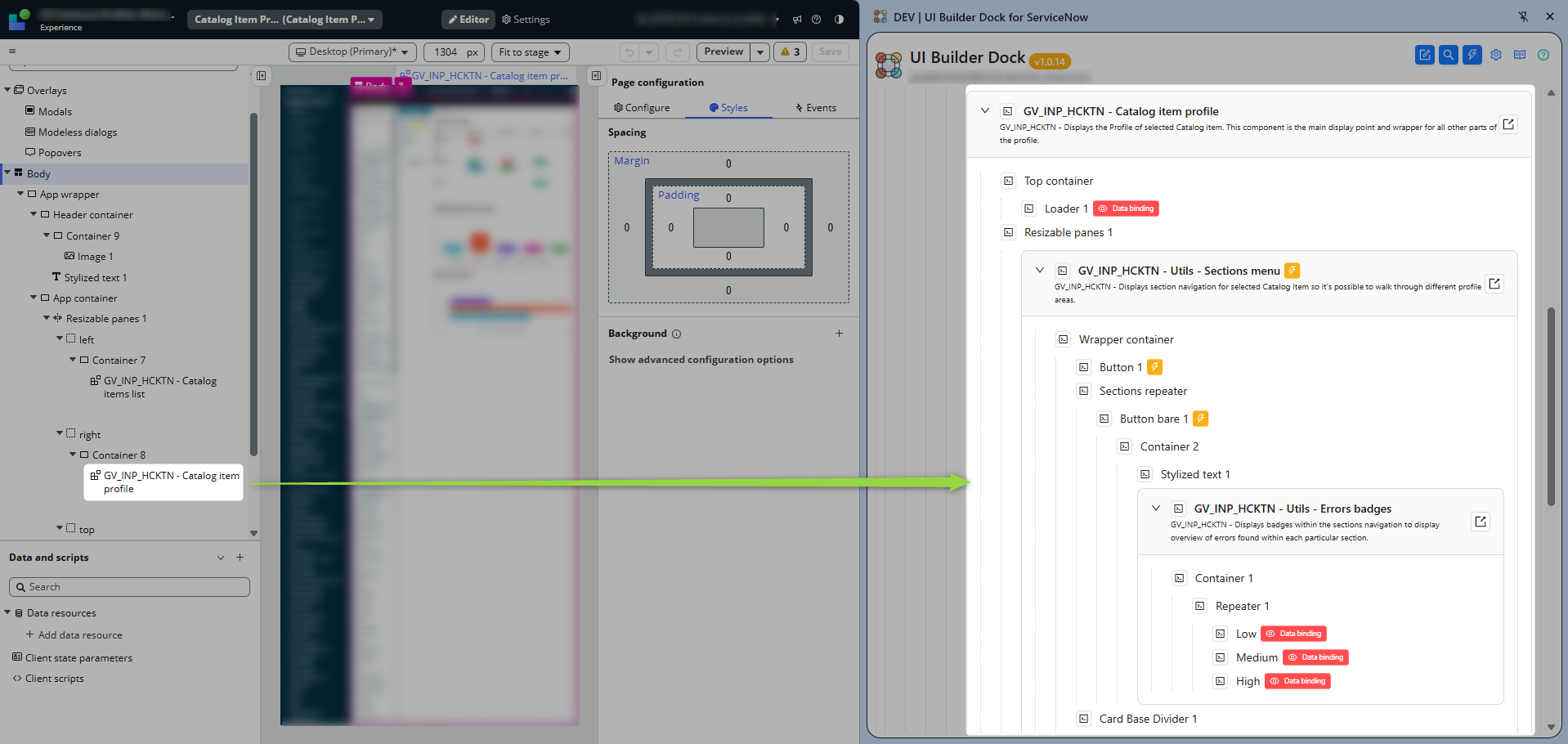
Moreover, I added flags to each element so it’s visible on first sight if there is some show/hide logic or if the element is handling any events.

To provide a full picture of what’s going on, it’s possible to display the whole composition of each element. This means that when an element displays a flag indicating show/hide logic, you can immediately inspect how that logic is implemented (although only in the JSON payload; I think that rendering that JSON would be unnecessary overkill).

What is this for anyway?
Wanting to see a full picture of a tree makes sense only when building with UIB custom components. If you have standard experience, you can still display the tree but the tool does not inspect viewports or page collections 😎
But for single page apps composed of custom components, it will give you full insight into how your app is structured, and you can even see basic behavior hints in the tree right away.
And I like it!
🚀 GitHUb Source Code
Code of the extension is fully open so you can verify it’s integrity
🧩 Extension in Google Web Store
The extension is publicly available in the store.
Jan
 My UI Builder Corner ☕
Leave a comment