

While scripting in UIB, you don’t always have to repeat yourself (and we know that in Data Binding, we sometimes have to repeat ourselves..).
But for Client Scripts, you can write your utilities once and then reuse them across as you like.
Lets see how.
⚠️ Client alert
It’s important to notice that we are talking about Client Script Includes. Don’t confuse them with standard backend Script Includes; those are server-side.
Client Script Includes are front-end functions, and while they can extend each other (I will cover this in this article), you need to understand that we are still on the client. No direct database operations, no direct access to GlideRecords, etc.
Creation
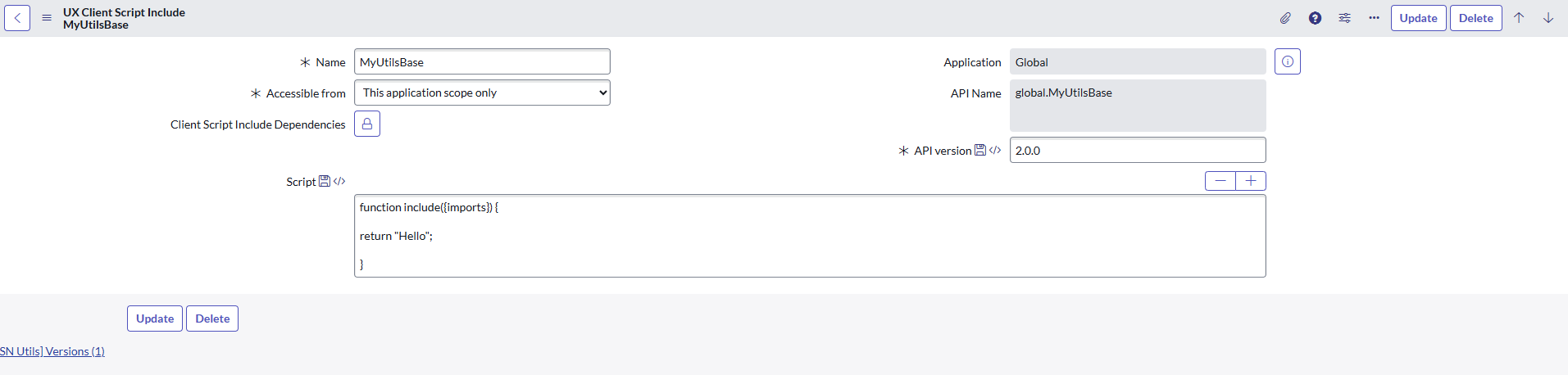
All Client Script Includes are located in [sys_ux_client_script_include] table. And this is where you can create one.
And yes, it’s absolutely terrible that even today, the script field is still just plain text, so if you want to write something in it, you have to write it separately and then copy & paste it in 😐
Import
There are two steps you need to take. First, you need to select your Client Script Include in the “Add a client script include” dropdown, and second, import it into the script.
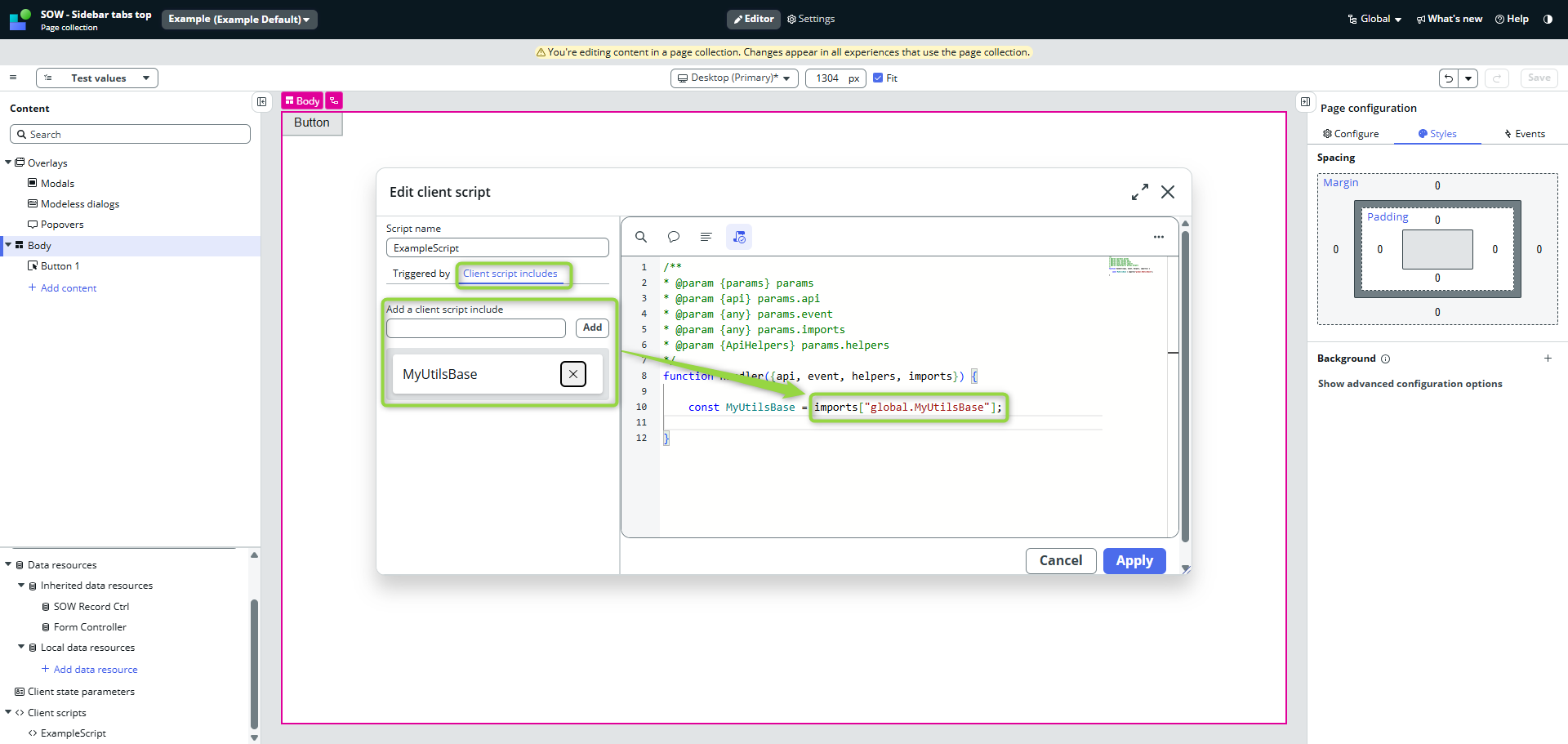
The syntax is pretty straightforward:
import["<API Name of your Client Script Include>"];
There are several ways of usage.
Direct usage
If you import it just like in the example:
function handler({api, event, helpers, imports}) {
    const MyUtilsBase = imports["global.MyUtilsBase"];
 }
then it means you only saved the reference of your script function into the variable. UIB does not call it until you do so.
It’s basically as same as this 👇
function handler({api, event, helpers, imports}) {

	const MyUtilsBase = function include({imports}) {
        console.log("Called!");
        return "Hello";
	};

 }
If you had Client Script Include “MyUtilsBase” like this
function include({imports}) {
    console.log("Called!");
    return "Hello";
}
Then usage would look like this:
function handler({api, event, helpers, imports}) {
  	const MyUtilsBase = imports["global.MyUtilsBase"];
	let myResult = MyUtilsBase();
 }
You would see “Called!” in browser console and variable myResult would contain “Hello” string.
Utility usage
Better usage of Client Script Includes would be to use them as a reusable utility functions.
To do so, you just need to return those functions from your Client Script Include
function include({imports}) {

    const myFunctionOne = () => {
        return "myFunctionOne";
    };

    const myFunctionTwo = () => {
        return "myFunctionTwo";
    };

    return {
        myFunctionOne,
        myFunctionTwo
    }

}
and call the import right away so UIB calls it for you and register all of those function.
const MyUtilsBase = imports["global.MyUtilsBase"]();
Now you can use your functions in your Client Script
function handler({api, event, helpers, imports}) {

    const MyUtilsBase = imports["global.MyUtilsBase"]();
    console.log(MyUtilsBase.myFunctionOne());

}
You can as well destruct all of the functions from it right away:
function handler({api, event, helpers, imports}) {

    const {
        myFunctionOne,
        myFunctionTwo
    } = imports["global.MyUtilsBase"]();

    console.log(myFunctionTwo());

}
Class usage
If you need more robust solution, you can of course implement one or more classes.
function include({imports}) {

    class MyService {

        constructor() {
        }

        myMethod = () => {
            return "My method response";
        }

    }

	return  MyService;

}
Usage in Client Script would then look like this
function handler({api, event, helpers, imports}) {

    // Import and invoke, MyUtilsBase becomes the class
    const MyUtilsBase = imports["global.MyUtilsBase"]();

    // Class init
    const MyService = new MyUtilsBase();

    // Usage...
    console.log(MyService.myMethod());

}
And of course, you can pass all Client Script objects down to the class so you can work with them there as well.
UX Client Script Include
function include({imports}) {

    class MyService {

        constructor(api, helpers) {
            this.api = api;
            this.helpers = helpers;
        }

        // ...

    }

	return  MyService;

}
Client Script in UIB
// ...

// Class init
const MyService = new MyUtilsBase(api, helpers);

// ...
Import one UX Client Script Include into another
To increase the reusability, you can import one into another. The imports (that I showed you above) works there as same as well.
So if I want to create another UX Client Script Include that “extends” (contains) features from another one, you can do it like this 👇
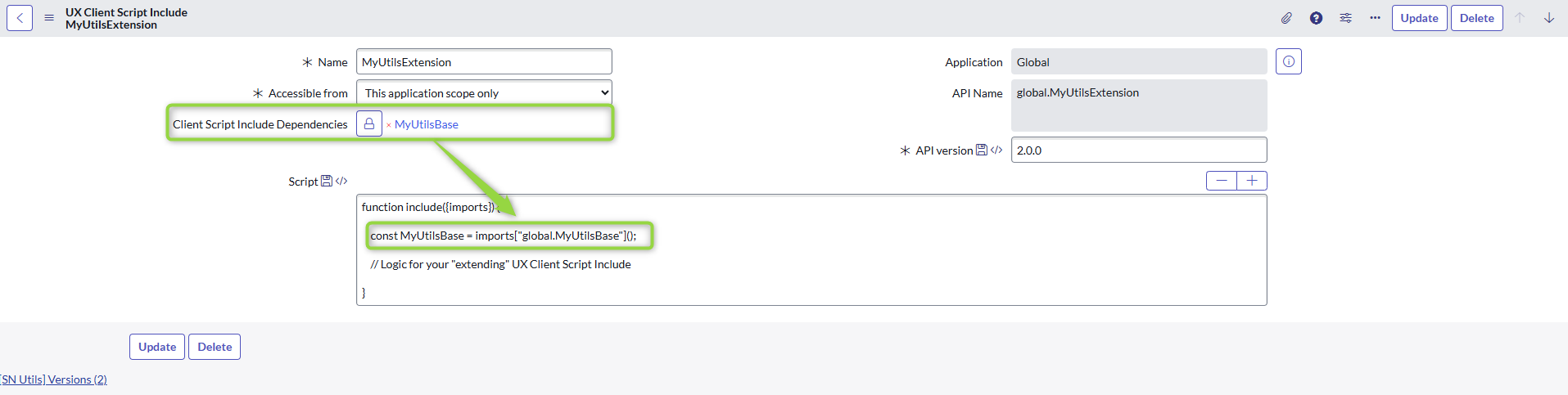
How you use it depends on the architecture of your implementation. The extension can work with the base only internally and return only its own methods/functions, or it can return its methods and the methods of the base… I am going into too much detail now 🌀
🗞️ To wrap it up
- UX Client Script Includes are reusable pieces of client-side code
- It’s a function, so you need to call it upon the import
👉 import[“<API Name of your Client Script Include>”](); - You can import one or more into another if you like
Enjoy!
Jan


 My UI Builder Corner ☕
Leave a comment