

There are several ways in which you can show/hide pages in Configurable Workspaces: Roles, Inline Conditions, Audiences… But what if you need to make any advanced decision via scripting? Checking GlideRecords, calling Script Includes…?
Well, that’s why there are UX Screen Conditions for.
Lets have a look!
SOW – Record information
Look at this page in SOW. What if the OOB condition is not enough, and you would like to add some extra logic via scripting?

Click on Screen condition and create new.

Script
This is your logic. It’s going to be a self-invoked function that accepts input parameters from the data binding (I will explain in a second).
It’s a server-side logic so you can do any operations with GlideRecords, Script includes, Sys properties, etc.
A template could look like this.
(function evaluateCondition(params) {

	// Your logic that returns true/false
    console.log(params);

})(inputProperties);
Param mapping
This is where you define what data should be available for you in the script. It’s basically a mapping between record fields (coming from the controller) and input properties of a function in your script.
An interface for that base object would look like this
interface MapContainer {
  type: "MAP_CONTAINER";
  container: {
    [key: string]: DataOutputBinding;
  };
}
An interface for container property would look like this
interface DataOutputBinding {
  type: "DATA_OUTPUT_BINDING";
  binding: {
    address: string[];
  };
}
Example when you want to access “short_description”
{
    "type": "MAP_CONTAINER",
    "container": {
        "myInputShortDescription": {
            "type": "DATA_OUTPUT_BINDING",
            "binding": {
                "address": [
                    "record",
                    "form",
                    "fields",
                    "short_description",
                    "value"
                ]
            }
        }
    }
}
Notice that the binding address is just array of strings constructed from real path of the controller.
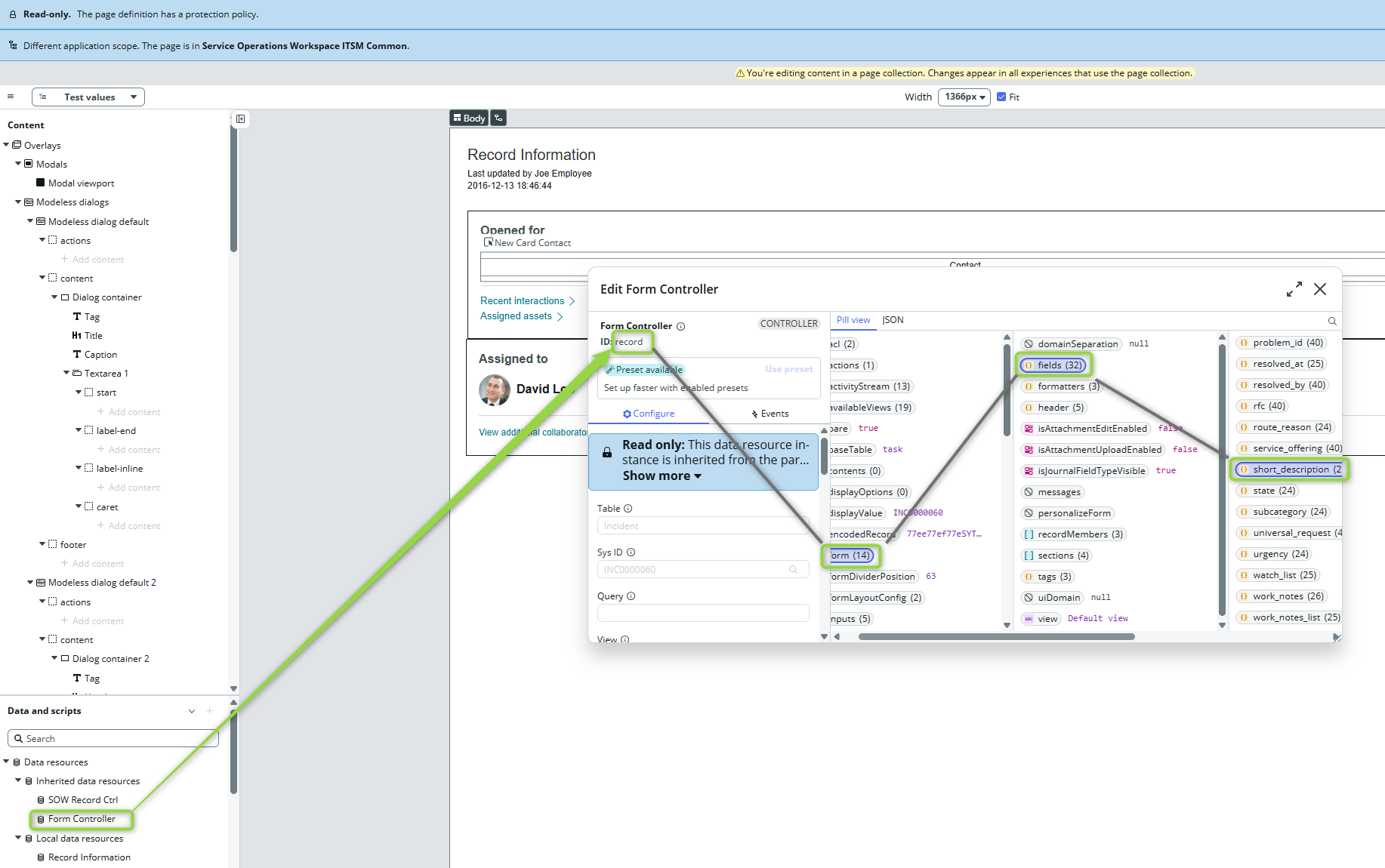
If you take the above-mentioned examples to create such an UX Screen Condition and refresh the SOW, you would see a log as an object with a “data” property. Like this 👇

Now you can take the value to build your logic.
Example
I want to see Record Information only when Short description is “hello”.
(function evaluateCondition(params) {

    return (params.data.myInputShortDescription == "hello");

})(inputProperties);

Now we have dynamic show/hide logic. You don’t even have to save the form. It reacts immediately because we are connected to the controller. And the controller holds real-time data.
But, at the same time, the script is a backend operation so the evaluation will be called every time the binding object (short description in our case) changes.
Keep this in mind before you start working on some big, complex logic 💡 As always, scripting should be the last possible option you choose. Inline conditions and Audiences are always better and, more importantly, faster!
 My UI Builder Corner ☕
Leave a comment